Mastering Slack Workspaces

Mastering Slack Workspaces: Building Collaborative Excellence

Slack isn’t just another tool in the digital workspace arsenal. It’s a meticulously designed ecosystem where teams come together to create, collaborate, and innovate. Let’s dive into the fundamentals of setting up workspaces, uncovering the blueprint for Enterprise Grid, and understanding the art of managing workspace visibility and access.

What Is a Slack Workspace?

In Slack’s world, a workspace is the central hub of your team’s activities. It’s not just a collection of conversations—it’s a dynamic environment tailored for collaboration. While a workspace is your command center, channels within it act as specialized neighborhoods for focused discussions.

Setting Up Your Workspace: A Step-by-Step Guide

Creating your workspace is straightforward yet impactful:

  1. Start with the Basics Visit slack.com/create and follow the prompts to set up your space. Select a name reflecting your company’s identity and ensure the workspace URL aligns with your brand.
  2. Onboard Your Team Send email invitations or share invite links to make onboarding seamless.
  3. Design Channels Intentionally Create topic-specific channels, such as #marketing or #help-desk, to streamline discussions.
  4. Enhance Productivity with Apps Add tools and integrations that complement your workflows.

Designing the Ultimate Workspace

A well-designed workspace isn’t just functional—it fosters engagement:

  • Map Operations Reflect your organization’s structure by creating channels corresponding to departments or projects.
  • Define Roles and Permissions Clearly set who can create channels or invite members through settings.
  • Name Channels Strategically Use naming conventions to maintain clarity and relevance.
  • Conduct Regular Reviews Periodically assess your workspace to keep it aligned with evolving needs.
  • Embrace Feedback Adapt your design based on team input to ensure optimal functionality.

Enterprise Grid: The Blueprint for Large Organizations

For sprawling organizations, Slack’s Enterprise Grid acts as the motherboard, seamlessly connecting multiple workspaces. Imagine your company as a bustling city. Each department or project is a neighborhood, while the Enterprise Grid is the city plan that ties everything together.

  1. Start with a Blueprint Sketch out your workspace plan using tools like Lucidchart and gather input from department heads to ensure alignment with team needs.
  2. Plan for Growth Create fewer workspaces initially and expand as needed. Design templates with standardized settings, naming conventions, and permissions.
  3. Balance Structure and Flexibility Clearly outline workspace purposes, and assign admins to oversee day-to-day operations.
  4. Best Practices for Enterprise Grid
    • Avoid workspace sprawl; aim for the Goldilocks zone of just the right number of workspaces.
    • Use multi-workspace channels for broad collaborations.
    • Ensure every member has a “home” workspace and intuitive navigation.

Managing Visibility and Access: Be the Gatekeeper

Slack offers four visibility settings tailored to varying collaboration needs:

  1. Open: Accessible to all in the organization.
  2. By Request: Members apply for access, ensuring a moderated environment.
  3. Invite-Only: Exclusive for invited members—ideal for confidential projects.
  4. Hidden: Completely private and by invitation only.

Use tools like Slack Connect for secure external collaborations and manage permissions to maintain confidentiality where necessary.

The Power of Multi-Workspace Channels

Think of multi-workspace channels as the hallways connecting the various rooms in your city. They enable cross-department collaboration, such as creating a #product-launch channel for marketing and product teams to unite.

Set permissions thoughtfully to balance collaboration with confidentiality. Restrict posting rights for announcement-focused channels to maintain clarity and focus.

The Intersection of Culture and Technology

Great workspaces are a reflection of the team culture they foster. While technology facilitates collaboration, it’s the people and their needs that drive its success. Design your workspace to serve both.

overview of amazon DMS, sct and additional database services

In today’s dynamic digital landscape, businesses are continually seeking ways to optimize operations, reduce costs, and enhance agility. One of the most effective strategies to achieve these goals is by migrating data to the cloud. Amazon Database Migration Service (DMS) is an invaluable tool that simplifies the process of migrating databases to Amazon Web Services (AWS).

Amazon DMS is a managed service that facilitates the migration of databases to AWS quickly and securely. It supports various database engines, including:

  • Amazon Aurora
  • PostgreSQL
  • MySQL
  • MariaDB
  • Oracle
  • SQL Server
  • SAP ASE
  • and more!

With Amazon DMS, businesses can migrate data while minimizing downtime, making it ideal for operations that require continuous availability.

  1. Ease of Use: Amazon DMS is designed to be user-friendly, allowing you to start a new migration with just a few clicks in the AWS Management Console.
  2. Minimal Downtime: A key feature of Amazon DMS is its ability to keep the source database operational during the migration, ensuring minimal disruption to business activities.
  3. Support for Heterogeneous Migrations: Amazon DMS supports both homogeneous (same database engine) and heterogeneous (different database engines) migrations, providing flexibility to switch to the most suitable database engine.
  4. Continuous Data Replication: Amazon DMS enables continuous data replication from your source database to your target database, keeping them synchronized throughout the migration.
  5. Reliability and Scalability: Leveraging AWS’s robust infrastructure, Amazon DMS provides high availability and scalability to handle your data workload demands.
  6. Cost-Effective: With a pay-as-you-go pricing model, Amazon DMS offers a cost-effective solution, meaning you only pay for the resources used during the migration.

Step 1: Setup the Source and Target Endpoints

The initial step in using Amazon DMS is to configure your source and target database endpoints. The source endpoint is the database you are migrating from, and the target endpoint is the database you are migrating to.

Next, create a replication instance responsible for executing migration tasks and running the replication software.

Once the replication instance is set up, configure migration tasks that define the specific data to be migrated and the type of migration (full load, change data capture, or both).

With everything configured, start the migration process. Amazon DMS will migrate the data as specified in your migration tasks, ensuring minimal downtime and continuous data replication.

Monitor the progress and performance of your tasks using the AWS Management Console. Amazon DMS provides detailed metrics and logs to help optimize the migration process.

Amazon DMS is perfect for database consolidation, simplifying the management and reducing costs by consolidating multiple databases into a single database engine. This process improves performance and optimizes resource utilization.

  • Simplified Management: Managing a single database engine is easier than handling multiple disparate systems.
  • Cost Reduction: Consolidating databases can lead to significant cost savings by reducing licensing and maintenance expenses.
  • Improved Performance: A consolidated database environment can optimize resource utilization and enhance overall performance.

The Schema Conversion Tool (SCT) complements Amazon DMS by simplifying the migration of database schemas. SCT automatically converts source database schemas to formats compatible with target database engines, including database objects like tables, indexes, and views, as well as application code like stored procedures and functions.

  • Automatic Conversion: SCT automates schema conversion, reducing the manual effort required.
  • Assessment Reports: Detailed assessment reports highlight incompatibilities or conversion issues, enabling proactive resolution.
  • Data Warehouse Support: SCT supports data warehouse conversions, allowing businesses to migrate large-scale analytical workloads to AWS.

AWS offers a variety of managed database services that complement Amazon DMS, providing a comprehensive suite of tools to meet diverse data needs.

Amazon DocumentDB is a fully managed document database service designed for JSON-based workloads, compatible with MongoDB. It offers high availability, scalability, and security, making it ideal for modern applications.

Amazon Neptune is a fully managed graph database service optimized for storing and querying highly connected data. It supports Property Graph and RDF models, making it suitable for social networking, recommendation engines, and fraud detection.

Amazon QLDB is a fully managed ledger database providing a transparent, immutable, and cryptographically verifiable transaction log. It is perfect for applications requiring an authoritative transaction record, such as financial systems, supply chain management, and identity verification.

AWS Managed Blockchain enables the creation and management of scalable blockchain networks, supporting frameworks like Hyperledger Fabric and Ethereum. It is ideal for building decentralized applications.

Amazon ElastiCache

Amazon ElastiCache is a fully managed in-memory data store and cache service supporting Redis and Memcached. It accelerates web application performance by reducing latency and increasing throughput, suitable for caching, session management, and real-time analytics.

Amazon DynamoDB Accelerator (DAX) is a fully managed, in-memory cache for DynamoDB, providing fast read performance and reducing response times from milliseconds to microseconds. It is perfect for high read throughput and low-latency access use cases like gaming, media, and mobile applications.

Conclusion

Amazon Database Migration Service (DMS) is a versatile tool that simplifies database migration to the AWS cloud. Whether you’re consolidating databases, using the Schema Conversion Tool, or leveraging additional AWS database services like Amazon DocumentDB, Amazon Neptune, Amazon QLDB, Managed Blockchain, Amazon ElastiCache, or Amazon DAX, AWS offers a comprehensive suite of solutions to meet data needs.

brief overview of ddos threat

Understanding DDoS Attacks and AWS Protection

A Library Analogy for DDoS Attacks

Imagine a library where visitors can check out books at the front desk. After checking out their books, they enjoy reading them. However, suppose that a prankster checks out multiple books and never returns them. This causes the front desk to be unavailable to serve other visitors who genuinely want to check out books. The library can attempt to stop the false requests by identifying and blocking the prankster.

In this scenario, the prankster’s actions are similar to a denial-of-service (DoS) attack.

Denial-of-Service (DoS) Attacks

A denial-of-service (DoS) attack is a deliberate attempt to make a website or application unavailable to users. In a DoS attack, a single threat actor targets a website or application, flooding it with excessive network traffic until it becomes overloaded and unable to respond. This denies service to users who are trying to make legitimate requests.

Distributed Denial-of-Service (DDoS) Attacks

Now, suppose the prankster enlists the help of friends. Together, they check out multiple books and never return them, making it increasingly difficult for genuine visitors to check out books. These requests come from different sources, making it impossible for the library to block them all. This is similar to a distributed denial-of-service (DDoS) attack.

In a DDoS attack, multiple sources are used to start an attack that aims to make a website or application unavailable. This can come from a group of attackers or even a single attacker using multiple infected computers (bots) to send excessive traffic to a website or application.

Types of DDoS Attacks

DDoS attacks can be categorized based on the layer of the Open Systems Interconnection (OSI) model they target. The most common attacks occur at the Network (Layer 3), Transport (Layer 4), Presentation (Layer 6), and Application (Layer 7) layers. For example, SYN floods target Layer 4, while HTTP floods target Layer 7.

Slowloris Attack

One specific type of DDoS attack is the Slowloris attack. In a Slowloris attack, the attacker tries to keep many connections to the target web server open and hold them open as long as possible. It does this by sending partial requests, none of which are completed, thus tying up the server’s resources. This can eventually overwhelm the server, making it unable to respond to legitimate requests.

UDP Flood Attack

Another type of DDoS attack is the UDP flood attack. In a UDP flood attack, the attacker sends a large number of User Datagram Protocol (UDP) packets to random ports on a target server. The server, unable to find applications at those ports, responds with ICMP “Destination Unreachable” packets. This process consumes the server’s resources, eventually making it unable to handle legitimate requests.

AWS Shield: Your DDoS Protection Solution

To help minimize the effect of DoS and DDoS attacks on your applications, you can use AWS Shield. AWS Shield is a service that protects applications against DDoS attacks, offering two levels of protection: Standard and Advanced.

  • AWS Shield Standard: Automatically protects all AWS customers at no cost. It defends your AWS resources from the most common, frequently occurring types of DDoS attacks. As network traffic comes into your applications, AWS Shield Standard uses various analysis techniques to detect malicious traffic in real-time and automatically mitigates it.
  • AWS Shield Advanced: A paid service that provides detailed attack diagnostics and the ability to detect and mitigate sophisticated DDoS attacks. It also integrates with other services such as Amazon CloudFront, Amazon Route 53, and Elastic Load Balancing. Additionally, you can integrate AWS Shield with AWS WAF by writing custom rules to mitigate complex DDoS attacks.

Additional AWS Protection Services

  • AWS Web Application Firewall (WAF): Protects your applications from web-based attacks, such as SQL injection and cross-site scripting (XSS).
  • Amazon CloudFront and Amazon Route 53: These services offer built-in DDoS protection and can be used to distribute traffic across multiple locations, reducing the impact of an attack.

Best Practices for DDoS Protection

To enhance your DDoS protection, consider the following best practices:

  • Use AWS Shield: Enable AWS Shield Standard for basic protection and consider upgrading to AWS Shield Advanced for more comprehensive coverage.
  • Deploy AWS WAF: Use AWS WAF to protect your web applications from common web-based attacks.
  • Leverage CloudFront and Route 53: Use these services to distribute traffic and mitigate the impact of DDoS attacks.
  • Monitor and Respond: Regularly monitor your applications and network traffic for signs of DDoS attacks and respond quickly to mitigate any potential impact.

Conclusion

DDoS attacks are a serious threat to the availability and performance of your applications. By leveraging AWS Shield and other AWS services, you can protect your applications from these attacks and ensure they remain available and responsive to your users.

AWS DATABASE SERVICES AND AWS DMS OVERVIE

Effortlessly Migrating Databases with AWS Database Migration Service

Exploring various database options on AWS often raises the question: what about existing on-premises or cloud databases? Should we start from scratch, or does AWS offer a seamless migration solution? Enter Amazon Database Migration Service (DMS), designed to handle exactly that.

Amazon Database Migration Service (DMS)

Amazon DMS allows us to migrate our existing databases to AWS securely and efficiently. During the migration process, our source database remains fully operational, ensuring minimal downtime for dependent applications. Plus, the source and target databases don’t have to be of the same type.

Homogeneous Migrations

Homogeneous migrations involve migrating databases of the same type, such as:

  • MySQL to Amazon RDS for MySQL
  • Microsoft SQL Server to Amazon RDS for SQL Server
  • Oracle to Amazon RDS for Oracle

The compatibility of schema structures, data types, and database code between the source and target simplifies the process.

Heterogeneous Migrations

Heterogeneous migrations deal with databases of different types and require a two-step approach:

  1. Schema Conversion: The AWS Schema Conversion Tool converts the source schema and code to match the target database.
  2. Data Migration: DMS then migrates the data from the source to the target database.

Beyond Simple Migrations

AWS DMS isn’t just for migrations; it’s versatile enough for a variety of scenarios:

  • Development and Test Migrations: Migrate a copy of our production database to development or test environments without impacting production users.
  • Database Consolidation: Combine multiple databases into one central database.
  • Continuous Replication: Perform continuous data replication for disaster recovery or geographic distribution.

Additional AWS Database Services

AWS provides a suite of additional database services to meet diverse data management needs:

  • Amazon DocumentDB: A document database service that supports MongoDB workloads.
  • Amazon Neptune: A graph database service ideal for applications involving highly connected datasets like recommendation engines and fraud detection.
  • Amazon Quantum Ledger Database (Amazon QLDB): A ledger database service that maintains an immutable and verifiable record of all changes to our data.
  • Amazon Managed Blockchain: A service for creating and managing blockchain networks with open-source frameworks, facilitating decentralized transactions and data sharing.
  • Amazon ElastiCache: Adds caching layers to our databases, enhancing the read times of common requests. Supports Redis and Memcached.
  • Amazon DynamoDB Accelerator (DAX): An in-memory cache for DynamoDB that improves response times to microseconds.

Wrap-Up

Whether we’re migrating databases of the same or different types, AWS Database Migration Service (DMS) provides a robust and flexible solution to ensure smooth, secure migrations with minimal downtime. Additionally, AWS’s range of database services offers solutions for various other data management needs.

For further details, be sure to visit the AWS Database Migration Service page.

Exploring AWS Analytics Services: Focus on Athena, EMR, Glue, and Kinesis

AWS offers a variety of powerful analytics services designed to handle different data processing needs. In this blog, we will focus on Amazon Athena, Amazon EMR, AWS Glue, and Amazon Kinesis, as these services are most likely to appear on the AWS Certified Cloud Practitioner exam. You can follow the links provided to learn more about other AWS analytics services like Amazon CloudSearch, Amazon OpenSearch Service, Amazon QuickSight, Amazon Data Pipeline, AWS Lake Formation, and Amazon MSK.

Amazon EMR is a web service that allows businesses, researchers, data analysts, and developers to process vast amounts of data efficiently and cost-effectively. EMR uses a hosted Hadoop framework running on Amazon EC2 and Amazon S3 and supports Apache Spark, HBase, Presto, and Flink. Common use cases include log analysis, financial analysis, and ETL activities.

A Step is a programmatic task that processes data, while a cluster is a collection of EC2 instances provisioned by EMR to run these Steps. EMR uses Apache Hadoop, an open-source Java software framework, as its distributed data processing engine.

EMR is an excellent platform for deploying Apache Spark, an open-source distributed processing framework for big data workloads that utilizes in-memory caching and optimized query execution. You can also launch Presto clusters, an open-source distributed SQL query engine designed for fast analytic queries against large datasets. All nodes for a given cluster are launched in the same Amazon EC2 Availability Zone.

You can access Amazon EMR through the AWS Management Console, Command Line Tools, SDKs, or the EMR API. With EMR, you have access to the underlying operating system and can SSH in.

Amazon Athena is an interactive query service that allows you to analyze data in Amazon S3 using standard SQL. As a serverless service, there is no infrastructure to manage, and you only pay for the queries you run. Athena is easy to use: simply point to your data in Amazon S3, define the schema, and start querying using standard SQL.

Athena uses Presto with full standard SQL support and works with various data formats, including CSV, JSON, ORC, Apache Parquet, and Avro. It is ideal for quick ad-hoc querying and integrates with Amazon QuickSight for easy visualization. Athena can handle complex analysis, including large joins, window functions, and arrays, and uses a managed Data Catalog to store information and schemas about the databases and tables you create for your data stored in Amazon S3.

AWS Glue is a fully managed, pay-as-you-go, extract, transform, and load (ETL) service that automates data preparation for analytics. AWS Glue automatically discovers and profiles data via the Glue Data Catalog, recommends and generates ETL code to transform your source data into target schemas, and runs the ETL jobs on a fully managed, scale-out Apache Spark environment to load your data into its destination.

AWS Glue allows you to set up, orchestrate, and monitor complex data flows, and you can create and run an ETL job with a few clicks in the AWS Management Console. Glue can discover both structured and semi-structured data stored in data lakes on Amazon S3, data warehouses in Amazon Redshift, and various databases running on AWS. It provides a unified view of data via the Glue Data Catalog, which is available for ETL, querying, and reporting using services like Amazon Athena, Amazon EMR, and Amazon Redshift Spectrum. Glue generates Scala or Python code for ETL jobs that you can customize further using familiar tools. As a serverless service, there are no compute resources to configure and manage.

AWS offers several query services and data processing frameworks to address different needs and use cases, such as Amazon Athena, Amazon Redshift, and Amazon EMR.

  • Amazon Redshift provides the fastest query performance for enterprise reporting and business intelligence workloads, especially those involving complex SQL with multiple joins and sub-queries.
  • Amazon EMR simplifies and makes it cost-effective to run highly distributed processing frameworks like Hadoop, Spark, and Presto, compared to on-premises deployments. It is flexible, allowing you to run custom applications and code and define specific compute, memory, storage, and application parameters to optimize your analytic requirements.
  • Amazon Athena offers the easiest way to run ad-hoc queries for data in S3 without needing to set up or manage any servers.

Below is a summary of primary use cases for a few AWS query and analytics services:

AWS ServicePrimary Use CaseWhen to Use
Amazon AthenaQueryRun interactive queries against data directly in Amazon S3 without worrying about data formatting or infrastructure management. Can be used with other services such as Amazon Redshift.
Amazon RedshiftData WarehousePull data from multiple sources, format and organize it, store it, and support complex, high-speed queries for business reports.
Amazon EMRData ProcessingHighly distributed processing frameworks like Hadoop, Spark, and Presto. Run scale-out data processing tasks for applications such as machine learning, graph analytics, data transformation, and streaming data.
AWS GlueETL ServiceTransform and move data to various destinations. Used to prepare and load data for analytics. Data sources can be S3, Redshift, or other databases. Glue Data Catalog can be queried by Athena, EMR, and Redshift Spectrum.

Amazon Kinesis makes it easy to collect, process, and analyze real-time, streaming data for timely insights and quick reactions to new information. It offers a collection of services for processing streams of various data, processed in “shards.” There are four types of Kinesis services:

Kinesis Video Streams securely streams video from connected devices to AWS for analytics, machine learning (ML), and other processing. It durably stores, encrypts, and indexes video data streams, allowing access to data through easy-to-use APIs. Data producers provide data streams, stored for 24 hours by default, up to 7 days. Consumers receive and process data, with multiple shards in a stream and support for server-side encryption (KMS) with a customer master key.

Kinesis Data Streams enables custom applications that process or analyze streaming data for specialized needs. It allows real-time processing of streaming big data, rapidly moving data off data producers and continuously processing it. Kinesis Data Streams stores data for later processing by applications, differing from Firehose, which delivers data directly to AWS services.

Common use cases include:

  • Accelerated log and data feed intake
  • Real-time metrics and reporting
  • Real-time data analytics
  • Complex stream processing

Kinesis Data Firehose is the easiest way to load streaming data into data stores and analytics tools. It captures, transforms, and loads streaming data, enabling near real-time analytics with existing business intelligence tools and dashboards. Firehose can use Kinesis Data Streams as sources, batch, compress, and encrypt data before loading, and synchronously replicate data across three availability zones (AZs) as it is transported to destinations. Each delivery stream stores data records for up to 24 hours.

Kinesis Data Analytics is the easiest way to process and analyze real-time, streaming data using standard SQL queries. It provides real-time analysis with use cases including:

  • Generating time-series analytics
  • Feeding real-time dashboards
  • Creating real-time alerts and notifications
  • Quickly authoring and running powerful SQL code against streaming sources

Kinesis Data Analytics can ingest data from Kinesis Streams and Firehose, outputting to S3, Redshift, Elasticsearch, and Kinesis Data Streams.

Deploying an Application Using AWS Elastic Beanstalk

We can see here deploying a basic PHP based application using AWS beanstalk service. we want to run y our application in AWS without having to provision, configure, or manage the EC2 instances ourself.

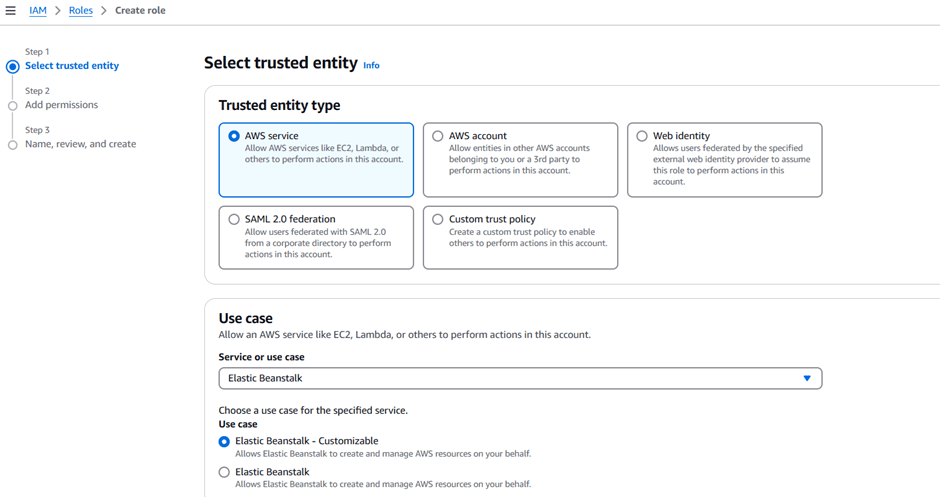
First, you’ll need to create a service role for Elastic Beanstalk, allowing the service to deploy AWS services on your behalf. Follow these steps:

  1. Search for IAM in the AWS console.
  2. Select “Roles” and then “Create role”.
  3. Set the Trusted entity type to AWS service.
  4. Under Use cases, search for Elastic Beanstalk and select “Elastic Beanstalk – Customizable”.
  5. Click “Next”, and then “Next” again as the permissions are automatically selected.
  6. Name the role ServiceRoleForElasticBeanstalk.
  7. Scroll to the bottom and click “Create role”.

REFERENCE SCREENSHOT

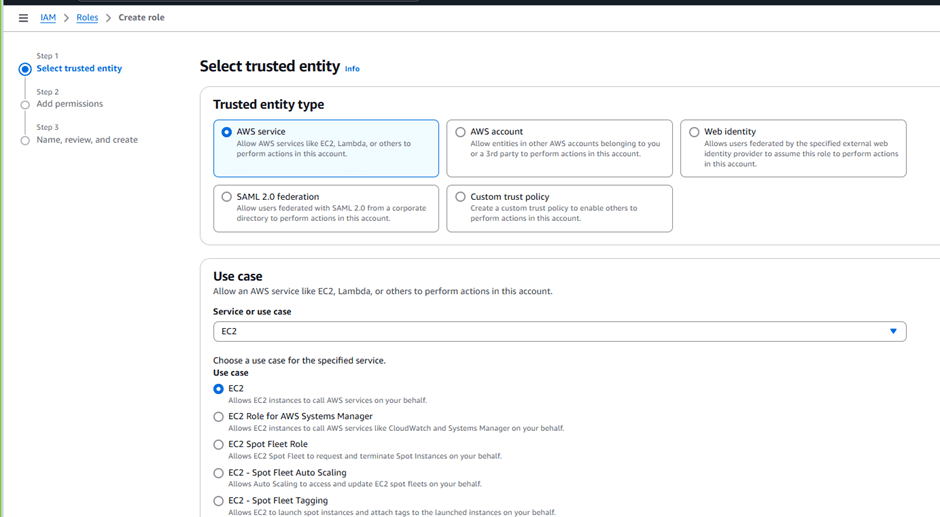
Next, you’ll configure an EC2 instance profile to give the instance the required permissions to interact with Elastic Beanstalk:

  1. Select “Create role” again in IAM.
  2. Set the Trusted entity type to AWS service.
  3. Under Use case, select EC2 under Commonly used services.
  4. Click “Next”.
  5. Search for AWS Elastic Beanstalk read only policy and select it.
  6. Click “Next”.
  7. Name the role CustomEC2InstanceProfileForElasticBeanstalk.
  8. Scroll to the bottom and click “Create role”.

REFERENCE SCREENSHOT

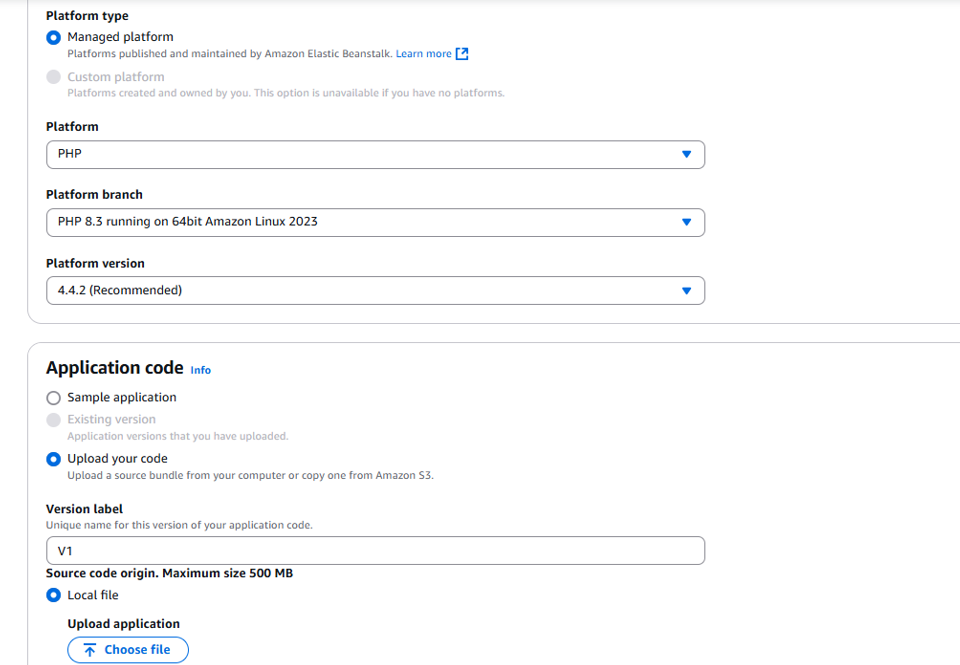
Now, you’re ready to create your application by uploading the provided code:

  1. Search for Elastic Beanstalk in the AWS console.
  2. Select “Create application”.
  3. Choose “Web server environment”.
  4. Enter the application name as BeanStalkDemo.
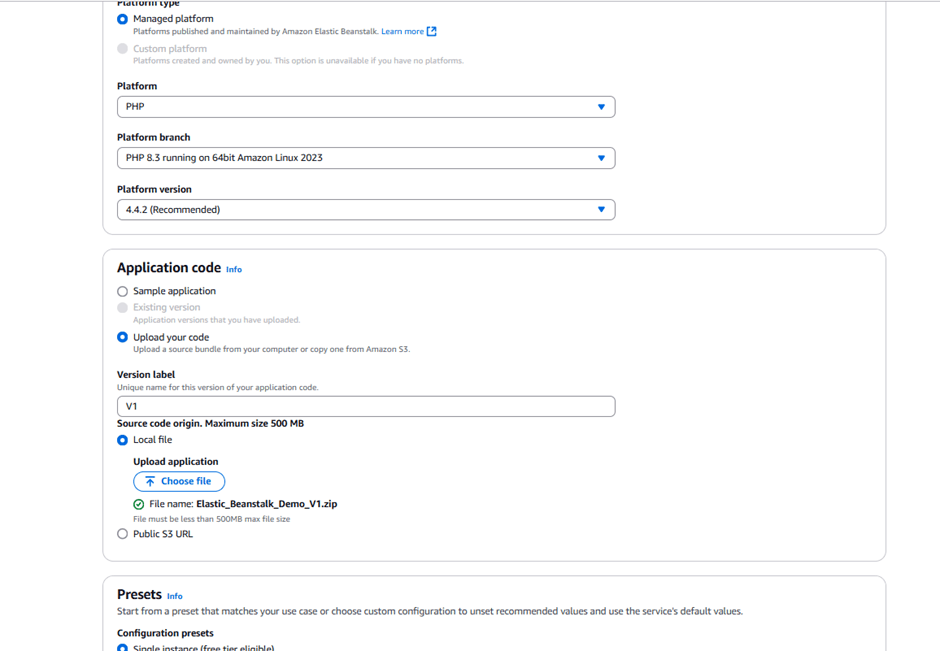
  5. Choose a managed platform and select PHP.
  6. Under Application code, upload your code. Set the version label to v1.
  1. Use the file you downloaded earlier.
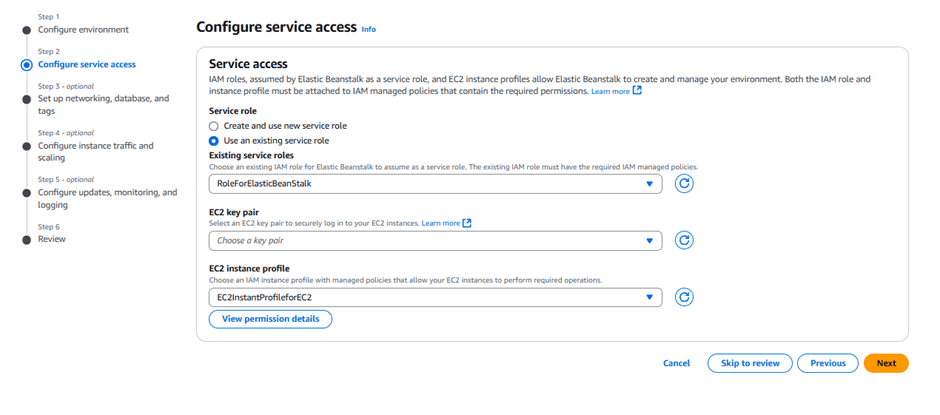
  2. Under Service role, select ServiceRoleForElasticBeanstalk.
  3. Under EC2 instance profile, select EC2InstanceProfileForElasticBeanstalk.
  4. Click “Next” through the optional configuration pages.
  1. On the Configure updates, monitoring, and logging page, select basic health reporting and deactivate managed updates.
  2. Click “Submit”.

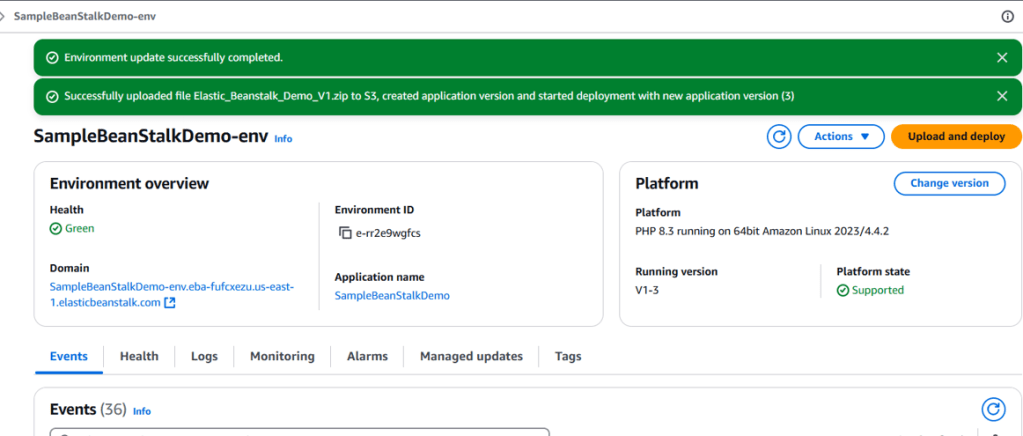
After a few minutes, your Elastic Beanstalk environment will be ready. You’ll see a confirmation message, and you can click the domain URL under the Environment overview to access your application.

Hit the Domain URL it should take us to the deployed website.

And there you have it! Elastic Beanstalk deploys and scales your web applications, provisioning the necessary AWS resources such as EC2 instances, RDS databases, S3 storage, Elastic Load Balancers, and auto-scaling groups.

AWS MONITORING AND LOGGING SERVICES

This category of services provides monitoring, logging and auditing of services which are running on AWS.

AWS CLOUDWATCH

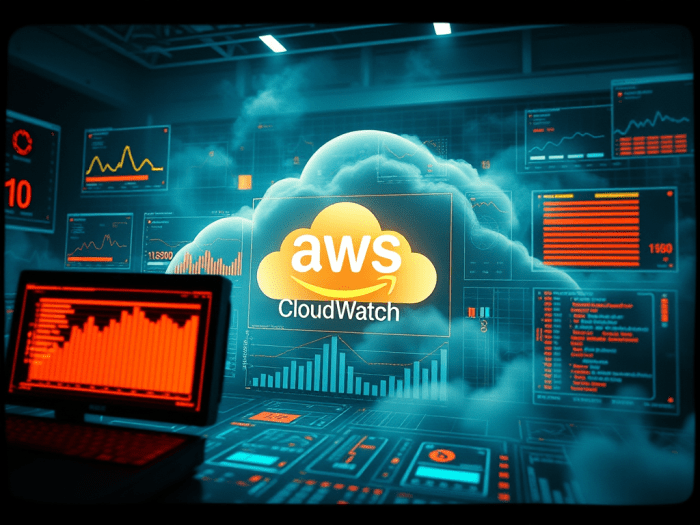
AWS cloudwatch is a monitoring service for AWS resources and applications running on AWS it’s a performance monitoring service and at same time CloudTrail is for auditing.

Used to collect and track metrics collect logs and monitor them and accordingly set alarms. Cloudwatch mostly monitors below resources.

  • EC2 Instances
  • Dynamo DB
  • RDS DB instances
  • Custom metrics generated by applications and services
  • Log files generated by applications deployed on AWS. Monitors application performance, resource utilization, operational health.

CloudWatch is accessed via API, command-line interface, AWS SDKs, and the AWS Management Console. CloudWatch integrates with IAM.`

CloudWatch retains metric data as follows:

  • Data points with a period of less than 60 seconds are available for 3 hours. These data points are high-resolution custom metrics.
  • Data points with a period of 60 seconds (1 minute) are available for 15 days.
  • Data points with a period of 300 seconds (5 minute) are available for 63 days.
  • Data points with a period of 3600 seconds (1 hour) are available for 455 days (15 months).

Cloudtrail provides visibility into user activity by recording actions taken on your account. API history enables security analysis, resource change tracking, and compliance auditing.
Logs API calls made via:

  • AWS Management Console.
  • AWS SDKs.
  • Command line tools.
  • Higher-level AWS services (such as CloudFormation).

CloudTrail records account activity and service events from most AWS services and logs the following records:

  • The identity of the API caller.
  • The time of the API call.
  • The source IP address of the API caller.
  • The request parameters.
  • The response elements returned by the AWS service.

CloudTrail is enabled by default, it’s per AWS account. We can consolidate logs from multiple accounts using an S3 bucket:

  1. Turn on CloudTrail in the paying account.
  2. Create a bucket policy that allows cross-account access.
  3. Turn on CloudTrail in the other accounts and use the bucket in the paying account.

You can integrate CloudTrail with CloudWatch Logs to deliver data events captured by CloudTrail to a CloudWatch Logs log stream.

CloudTrail log file integrity validation feature allows you to determine whether a CloudTrail log file was unchanged, deleted, or modified since CloudTrail delivered it to the specified Amazon S3 bucket.

GEN-AI SOFTWARE STACK

software stack

A software stack, as we know, is a collection of tools used to build a software application. Similarly, developing a GENAI application also requires a specific software stack. To know more about software stacks, you can follow this link.

To better understand software stacks, you can follow the provided link. To develop our GENAI application, we should first know which software stacks we need to use.

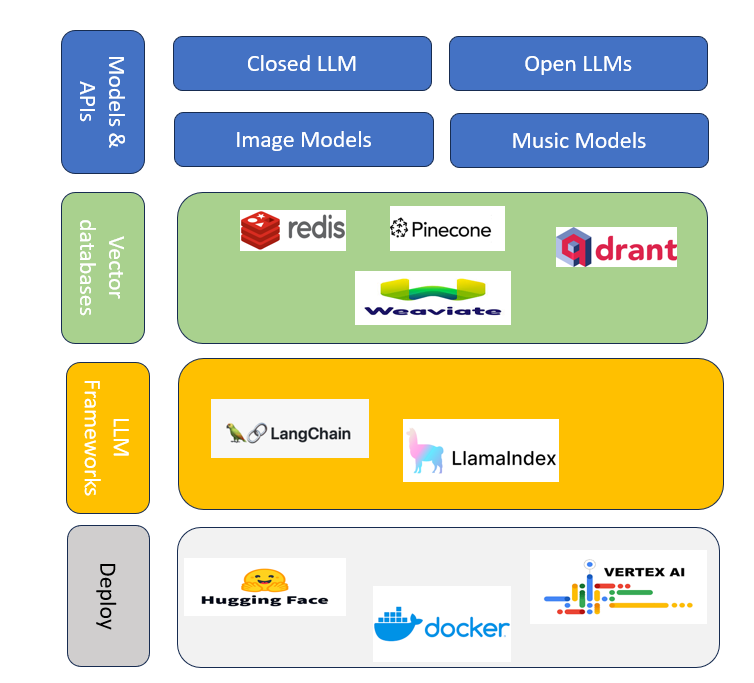
We have different categories of GENAI models broadly it can be defined under four categories.

  • Closed LLMs
    • PaLM 2 by google
    • LLaMA by Meta
  • Open LLMs
    • HuggingChat
    • Dolly by Databricks
    • StableLM by stability AI
    • OpenLLaMA by UC Berkley
  • Image Models
    • Midjourney
    • DALLE-3 2 by OpenAI
    • StableDiffusion by stability.ai
    • Runway
  • Music Models
    • MusicLM by google
    • MusicGen by Meta

A vector database is a specialized type of database designed to store and manage high-dimensional vector data. Unlike traditional databases that store scalar values (like numbers or text), vector databases handle complex data points represented as vectors1. These vectors can be thought of as arrows in a multi-dimensional space, capturing various characteristics or qualities of the data.

Vector databases are particularly useful for applications involving similarity searches. For example, they can be used to find images similar to a given image, recommend products based on user preferences, or even search for text that matches a particular context2.

Vector databases use Approximate Nearest Neighbor (ANN) search algorithms to quickly find the closest matching vectors. This is crucial for handling large datasets efficiently2. By clustering vectors based on similarity, these databases can perform low-latency queries, making them ideal for AI applications.

Combining vector databases with generative AI can unlock powerful capabilities:

Efficient Data Handling: Generative AI models often require large amounts of data for training. Vector databases can manage and organize this data effectively, enabling faster and more efficient model training1.

Enhanced Search and Retrieval: Vector databases can efficiently retrieve relevant data points for generative AI models, improving the accuracy and relevance of generated content1.

Personalization: By leveraging vector databases, generative AI can provide highly personalized recommendations and content, tailored to individual user preferences. Some examples of vector databases are given below :

  1. Pinecone
  2. Chroma
  3. Qdrant

LLM frameworks allows developer to build complex software using LLMs that can execute a sequence of tasks and access external APIs to perform more complex tasks. Frameworks LLMs to interact with other data sources and APIs and allow them to interact with the software environment. In some of the situation LLMs require to interact with external APIS such as WolframAlpha specifically to solve mathematical problems. Some examples of LLM frameworks are

  • Langchain
  • LlamaIndex
  • Anarchy

Deployment infrastructure is a combination of services provided by vendors, which allow GENAI applications to be deployed on them. Microsoft provides GENAI deployment services under Azure OpenAI Services. Other examples of deployment infrastructure are Vertex AI by Google and Hugging Face Inference Endpoints.

UNDERSTANDING SOFTWARE STACK

In the ever-evolving world of technology, understanding the concept of a software stack is crucial for developers, businesses, and tech enthusiasts alike. A software stack refers to a set of tools and technologies used together to build and run applications and systems. It’s essentially the backbone of any software project, ensuring that various components work seamlessly together. In this blog, we’ll dive into the different layers of a software stack, common examples, and why it’s important to choose the right stack for your project.

A typical software stack consists of several layers, each serving a specific purpose. Here’s a breakdown of the main layers:

  1. Operating System (OS):
    • The foundation of any software stack. The OS manages hardware resources and provides essential services for other software layers. Common operating systems include Linux, Windows, and macOS.
  2. Web Server:
    • Responsible for handling HTTP requests from clients (e.g., web browsers). Popular web servers include Apache, Nginx, and Microsoft IIS.
  3. Database:
    • Stores and manages data used by applications. Databases can be relational (like MySQL and PostgreSQL) or NoSQL (like MongoDB and Cassandra).
  4. Server-Side Programming Language:
    • The backend code that powers the application’s logic. Common languages include Python, Java, Ruby, PHP, and Node.js (JavaScript).
  5. Frontend Technologies:
    • Everything that users interact with directly in their browsers. This includes HTML, CSS, and JavaScript, along with frameworks like React, Angular, and Vue.js.
  6. APIs (Application Programming Interfaces):
    • Enable communication between different software components. RESTful APIs and GraphQL are widely used to connect the frontend with the backend.

There are several well-known software stacks, each with its own strengths and use cases. Here are a few popular ones:

  1. LAMP Stack:
    • Linux (OS)
    • Apache (Web Server)
    • MySQL (Database)
    • PHP/Perl/Python (Server-Side Programming Language)
    • Ideal for: Web development projects, especially open-source ones.
  2. MEAN Stack:
    • MongoDB (Database)
    • Express.js (Backend Framework)
    • Angular (Frontend Framework)
    • Node.js (Server-Side Programming Language)
    • Ideal for: Single-page applications and real-time web apps.
  3. MERN Stack:
    • Similar to the MEAN stack but uses React instead of Angular.
    • MongoDB (Database)
    • Express.js (Backend Framework)
    • React (Frontend Framework)
    • Node.js (Server-Side Programming Language)
    • Ideal for: Dynamic web applications with complex user interfaces.
  4. Django Stack:
    • Django (Backend Framework, using Python)
    • PostgreSQL/MySQL (Database)
    • JavaScript (Frontend)
    • Ideal for: Scalable web applications with robust backend needs.

Choosing the right software stack is vital for the success of your project. Here’s why:

  1. Performance:
    • Different stacks offer varying levels of performance. Choosing the right stack ensures your application runs efficiently and can handle the expected load.
  2. Scalability:
    • As your application grows, so do the demands on your software stack. Selecting a stack that supports scalability ensures your project can expand without major overhauls.
  3. Development Speed:
    • Some stacks come with powerful frameworks and tools that speed up development. This can significantly reduce time-to-market for your application.
  4. Community Support:
    • Popular stacks often have large communities and extensive documentation, making it easier to find solutions to common problems and stay updated with best practices.
  5. Cost:
    • The cost of development and maintenance varies between stacks. Open-source stacks like LAMP can be more cost-effective compared to proprietary solutions.

In conclusion, a software stack is an integral part of any software development project. Understanding the different layers and common examples helps you make informed decisions that align with your project’s goals and requirements. Whether you’re building a simple website or a complex application, choosing the right stack sets the foundation for success.

INTEGRATING COPILOT WITH GITHUB

BENEFIT OF INTEGRATION OF github COPILOT WITH GITHUB

Integrating Copilot with GitHub brings a range of exciting features that enhance your coding experience:

Adaptation to Repositories: Copilot can adapt to the coding standards and practices of your specific repositories.

Contextual Code Suggestions: Copilot can understand your code context and provide intelligent code suggestions as you type.

Autocomplete Code: It can finish lines or entire blocks of code based on your initial input.

Assisted Pull Requests: Copilot can help you draft pull requests by suggesting code snippets and descriptions.

Issue Resolution: It can suggest fixes for issues reported in your repository, making maintenance more efficient.

Generate Documentation: Copilot can help generate comments and documentation for your code, improving readability and maintainability.

Code Explanation: It can explain code snippets, making it easier to understand complex logic.

Review Assistance: Copilot can assist in reviewing code by suggesting improvements and catching potential errors.

Test Generation: It can help generate unit tests, ensuring your code is well-tested and robust.

Personalized Learning: As you use Copilot, it learns from your coding style and preferences, offering more relevant suggestions over time.

requirement

  • Subscription to Copilot. To use GitHub Copilot in Visual Studio Code, you must have an active GitHub Copilot subscription. For information about how to get access to Copilot, see “What is GitHub Copilot?.”
  • Visual Studio Code. To use GitHub Copilot in Visual Studio Code, you must have Visual Studio Code installed. For more information, see the Visual Studio Code download page.
  • Copilot extension for Visual Studio Code. To use GitHub Copilot in Visual Studio Code, you must install the GitHub Copilot extension. For more information, see “Set up GitHub Copilot in Visual Studio Code” in the Visual Studio Code documentation.

steps / instructions

INSTALLING GITHUB COPILOT EXTENTION

  • Within VSCode open the extension view
  • Search for the extension ‘GitHub Copilot‘ and then click on ‘Install‘.
    Search for GitHub Copilot
  • You may then be prompted to enter your GitHub credentials. Click on Sign in to GitHub, then click on Allow and enter your GitHub credentials.
  • Install the GitHub Copilot Extension
  • Click the Install button next to the GitHub Copilot extension. VSCode will download and install the extension.
    Sign In to GitHub
  • Once the extension is installed, you need to sign in to your GitHub account. You will see a prompt asking you to sign in. Click the Sign in with GitHub button. This will open a browser window where you can log in to your GitHub account and authorize GitHub Copilot.
  • It might prompt for authorization request as shown so authorize the same.
  • Once we authorize GITHUB extension will get downloaded and will with configured with VSCode and we can see the GITHUB extension icon over bottom right corner of the vscode editor
  • Also, once we click on this icon we can see the actual COPILOT menu over the VSCODE

GitHub Copilot and GitHub Copilot Chat are both powerful tools designed to assist developers, but they have different functionalities:

  • Primary Function: GitHub Copilot is an AI-powered code completion tool that helps developers write code faster and with fewer errors.
  • Usage: It integrates directly into your IDE (like Visual Studio Code) and provides real-time code suggestions as you type.
  • Features: It can complete entire lines or blocks of code, generate boilerplate code, and even suggest solutions based on the context of your code.
  • Focus: It’s primarily focused on improving the coding process by providing smart code suggestions.
  • Primary Function: GitHub Copilot Chat is designed to provide an interactive chat-based interface for developers to ask questions and receive answers related to their code.
  • Usage: It allows developers to engage in a conversation with the AI to understand code snippets, get explanations, and ask for assistance with debugging and problem-solving.
  • Features: It can explain code, suggest optimizations, help with debugging, and provide detailed answers to coding questions.
  • Focus: It’s geared towards creating a more interactive and educational experience, helping developers understand and improve their code through conversation.
  • Interaction Style: Copilot is more about inline code suggestions, while Copilot Chat focuses on conversational interaction.
  • Use Case: Use Copilot for quick code completions and suggestions; use Copilot Chat for in-depth explanations and assistance.

Both tools complement each other and can significantly enhance your development experience.