
Understand how Build Queue Service works
The following REST API endpoint can be used (e.g. with curl) to trigger a Bamboo build:
curl -X POST -u admin:password http://bamboo-host:8085/rest/api/latest/queue/PLAN-KEY?os_authType=basic
Replace:
adminwith a Bamboo username that has the permission to trigger a buildpasswordwith the respective user’s passwordhttp://bamboo-host:8085with Bamboo’s Base URLPLAN-KEYwith the Bamboo plan key for which a build is to be triggered
Ensure the curl command works before moving on to section #2 below.
How Build Queue Service can be triggered using JIRA Webhooks
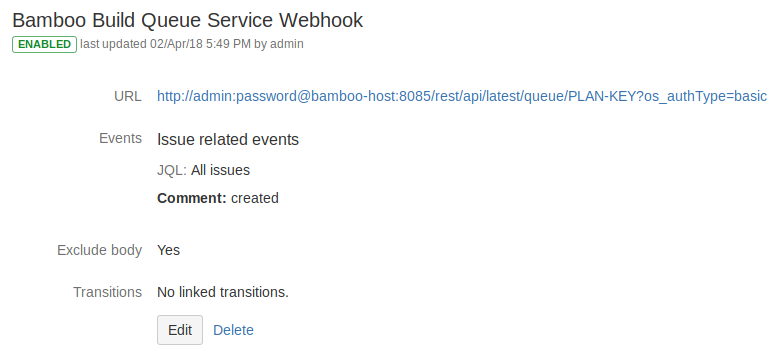
- The URL in section #1 above can be translated to a Webhook URL as follows:
http://admin:password@bamboo-host:8085/rest/api/latest/queue/PLAN-KEY?os_authType=basicusername and password are inserted in between the Base URL (after the double slashes and before the hostname) using the formatusername:password@ - When configuring Webhooks, the option
Exclude bodymust be checked
Example: A Build will be triggered when a Comment is added in a JIRA Issue

 DEVOPS | CLOUD | TOOLS